Email Heartbeat Overview
Some hosts cannot open outbound HTTP (locked-down cron boxes, legacy servers) but can still send mail. Seiri treats an email to your monitor’s address the same as an HTTP ping.
Where it lives
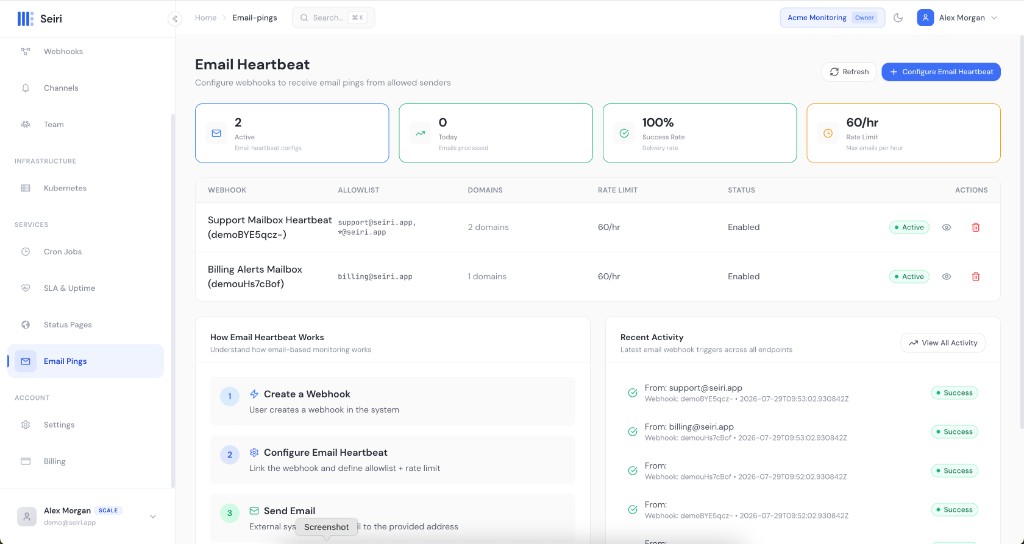
Services → Email Pings in cloud.seiri.app (page title: Email Heartbeat).
Email heartbeats are configured on top of an existing webhook — create the webhook under Core → Webhooks first.
Address shape
{webhook_ref}@ping.seiri.app
Example: deno-xFY-7Yv@ping.seiri.app
The local part is the webhook ref only (not org-slug:ref). That differs from the HTTP ping URL, which uses the full endpoint ID.
| Check-in method | Identifier |
|---|---|
| HTTP | https://ping.seiri.app/webhook/<org-slug>:<webhook-ref>/success |
<webhook-ref>@ping.seiri.app |
How it works
- Create a Periodic or Cron webhook.
- Open Email Pings → Configure Email Heartbeat.
- Select the webhook, set an allowlist of senders, save.
- From the job, send mail to
{webhook_ref}@ping.seiri.appwhen work finishes. - Put
[FAIL]or[ERROR]in the subject to report failure.
Allowlist and limits
- Allowlist entries: exact addresses (
cron@example.com) or domains (*@trusted.com). - Empty allowlist = not configured (emails will not count).
- Default rate limit: about 60 emails/hour per webhook.
- HTML is stripped; attachments are ignored; oversized bodies are rejected.
See Quickstart.